.svg)
Put your vehicles on the map.
The one travelers already have open.
Levy publishes GBFS — the open feed standard that trip-planning apps like Google Maps, Apple Maps, Transit and Citymapper read to show shared vehicles. Live availability, real pricing, real zones, generated from the same fleet state that runs your unlocks. No listing fee, no commission, no marketplace in between.
4 e-bikes nearby
Harbor Mobility · 2 min walk
Battery
88%
Unlock
$1.00
Per min
$0.35
vehicle_status.json
ttl 0 · real time
system_pricing_plans.json
rates published
One connected operating path
Google Maps & transit apps to Levy to the vehicle.
GBFS discovery feed
Google Maps & transit apps
Reads public vehicle, station, pricing, and zone feeds
Reservation and fleet system
Levy Fleets
Publishes current fleet state through the open GBFS format
Physical fulfillment
Connected vehicle
Appears as available only while it is actually rentable
The Standard
GBFS is how shared vehicles get onto a map.
The General Bikeshare Feed Specification is an open, public data standard maintained by MobilityData. An operator publishes a handful of JSON files at a public URL; trip-planning apps read those files and draw the vehicles. There is no contract to sign with the apps, no revenue share to negotiate, and nothing to install.
It is the plumbing behind almost every shared scooter, bike and moped you have ever seen inside a maps app. Levy generates it for you, from live fleet state, on every subaccount.
Someone lands in your city and opens a maps app to work out how to cross it.
That is the moment your fleet either exists or does not. They are not searching for your brand—they have never heard of it. They are asking how to get across town. A GBFS feed is what puts your vehicle in that answer.
Google Maps
Shared vehicles appear alongside transit, walking and driving directions.
Apple Maps
Shared-mobility layers built on operator-published feeds.
Transit
A dedicated multimodal planner used heavily in dense cities.
Citymapper
Route options that mix a scooter or bike leg into a trip.
Lyft
Consumer apps that surface nearby shared micromobility.
Aggregators & cities
Research, planning and open-data portals that ingest GBFS directly.
These are the categories of application that read GBFS feeds. Whether any particular app shows a particular fleet is that app's decision, made through its own intake process—see “Getting listed” below.
The Economics
Distribution that
does not take a cut.
Every other distribution channel prices itself as a share of what it sends you. A marketplace lists your inventory and keeps a percentage of every booking. GBFS is not that. It is an open feed the apps read for free, and the ride happens in your own app, on your own account, at your own price.
Nobody takes a percentage of a ride that started because a rider saw the vehicle on a map.
GBFS is an open specification. Publishing a feed costs nothing and needs no marketplace account.
The rider ends up in your app with your account, your pricing and your rules—not a marketplace profile.
A rider who found you once through a maps app has your app installed the second time.
The Feeds
Levy generates the whole feed set. You toggle it on.
Two endpoint families are published per subaccount: a core feed set at /api/gbfs/{fleet}, and the complete GBFS 3.0 file list at /api/gbfs/v3/{fleet}—which adds stations, regions, system alerts and the dataset manifest. A consumer that wants only the classic five files gets exactly those; a consumer that wants the full 3.0 set gets that too, from the same fleet data.
vehicle_status.json — real time, not nightly
Published with a TTL of zero and no caching. Every read reflects current position, battery, range and reservation state for the vehicles that are actually available right now. A rider who taps a pin finds a vehicle that is still there.
vehicle_types.json
Every model in your fleet, with its form factor and propulsion, so an app can tell a scooter from a moped from an e-bike.
system_pricing_plans.json
Unlock fee, per-minute and per-distance segments, taxability and currency—built from your actual pricing rules, so the rider sees the real price before tapping.
geofencing_zones.json
Your zones as GeoJSON with the rules attached: where a ride may start, where it may end, where riding through is allowed, and any speed cap.
Stations, regions and alerts
The GBFS 3.0 endpoints add station_information and station_status—built from your parking corrals and charging zones—plus system_regions and system_alerts driven by your active policy rules. Station-based systems are first-class, not an afterthought.
system_information.json
Your system name, operator, timezone, contact and support details—plus the rider app's store links and deep-link URI, so an app can hand the rider straight to you.
gbfs.json + manifest.json
The auto-discovery entry point. Hand an app one URL; it finds every other feed by itself. That single link is the whole integration.
Privacy by construction
Public vehicle IDs are randomised and rotate after each trip, so nobody can follow one vehicle across rides. No customer data, no ride history, no financials ever enter the feed.
The Difference
Most platforms treat GBFS
as a compliance checkbox.
Plenty of fleet software will export a GBFS file. It gets generated on a schedule, dropped on a bucket, and is wrong by the time an app reads it—vehicles shown where they no longer are, prices that changed last week, zones from a redraw two months ago. That is worse than not appearing at all, because a rider walks to a pin and finds nothing.
Levy generates the feed from the same live vehicle state that powers remote unlock, telemetry, geofencing and ride billing. There is no export step and no second copy of the truth. If the dashboard says a scooter is available at that corner with 88% battery, so does the feed—because they are reading the same row.
The feed is a view of live state, not a nightly copy of it.
Straight from the IoT telemetry your fleet already reports.
Not to the last export window.
Reserved, in-ride and out-of-service vehicles do not appear as available.
{
  "last_updated": "2026-08-11T14:31:07Z",
  "ttl": 0,
  "version": "3.0",
  "data": {
    "vehicles": [
      {
        "vehicle_id": "gbfs_7f2a91c4e0d3",
        "lat": 37.7955,
        "lon": -122.3937,
        "is_reserved": false,
        "is_disabled": false,
        "vehicle_type_id": "ebike-okai-eb100",
        "current_fuel_percent": 0.88,
        "current_range_meters": 42000
      }
    ]
  }
}vehicle_status.json
no-store, always fresh
system_alerts.json
policy rules, near-live
geofencing_zones.json
changes when zones change
system_pricing_plans.json
changes when pricing changes
The Technical Flow
Vehicle state to a paid ride, with nobody in the middle.
This is deliberately not the marketplace sequence. There is no availability call, no hold, no confirmation and no reservation, because GBFS has no booking API at all. It is a public read of live state, and the ride itself happens entirely inside your own app.
Live vehicle state
Your IoT telemetry writes position, battery, range and status onto the same rows the dashboard reads and the unlock path acts on. There is no export step and no second copy of the truth.
Fleet telemetryThe feed is generated on the request
A consumer asks for vehicle_status.json and Levy builds it right then, from live state. It is served with ttl 0 and no-store, so nothing between you and the app can serve a cached answer.
/api/gbfs/{fleet}/vehicle_status.json · ttl 0One URL hands over the whole set
gbfs.json is the auto-discovery entry point: give an app that single link and it finds every other file itself. GBFS 3.0 consumers get manifest.json and the full file list from the v3 path.
/api/gbfs/{fleet}/gbfs.jsonA trip-planning app ingests it
The app polls on its own schedule, honouring each file’s ttl — the static files daily, vehicle_status continuously. Whether any particular app displays a particular fleet is that app’s decision, not ours.
Consumer polls the feed setThe rider sees the vehicle on the map
A pin with real battery and range from vehicle_status, the real published price from system_pricing_plans, and the operating area from geofencing_zones. They were not searching for your brand — they were asking how to cross town.
vehicle_status + system_pricing_plansDeep link into your app
system_information.json publishes rental_apps — the iOS and Android store links and the deep-link discovery URI — so the app can hand the rider straight to you instead of dead-ending on a pin.
system_information.rental_appsThey unlock in your app
Your account, your rules, your rider record. The vehicle they tapped is the vehicle that opens, because the pin was drawn from the same live state the unlock acts on.
Rider app → vehicleThe ride bills as your own
Unlock fee, per-minute and per-distance segments, all from your pricing rules — the same rules the feed published. Nothing about this ride is a marketplace booking.
Your pricing rulesgbfs.json
ttl 86400
manifest.json
ttl 86400
system_information.json
ttl 86400
vehicle_types.json
ttl 86400
system_pricing_plans.json
ttl 86400
geofencing_zones.json
ttl 86400
system_regions.json
ttl 86400
station_information.json
ttl 86400
system_alerts.json
ttl 300
station_status.json
ttl 60
vehicle_status.json
ttl 0
/api/gbfs/{fleet} for consumers that want only the classic set. Stations, regions, alerts and the dataset manifest come from the GBFS 3.0 path.Nobody sits between the rider and you, so nobody takes a percentage. The ride is a direct ride that happens to have started on someone else’s map.
GBFS is a read-only public feed. There is nothing here to reserve against, no hold, no confirmation and no reservation — that machinery lives on the marketplace channels instead.
GBFS has no per-consumer access control. Any app, researcher or city that finds the URL can read it. Public vehicle IDs are randomised and rotate after each trip.
Publishing makes the data available; it does not put you inside any particular app. Registration in the MobilityData catalog is the step that makes a new feed discoverable.
Getting Listed
What we will and
will not promise.
The feed is the part Levy controls, and it is done. Being picked up by a specific app is the part the app controls, and we are not going to pretend otherwise. What we can do is give you a valid, live, spec-shaped feed and help you through the registration path that consumers actually watch.
Registration is a real step, not a switch
Turning on the feed makes your data available. It does not, by itself, put you inside any particular app. Each consuming app runs its own intake and decides what it ingests, on its own timeline. Anyone who tells you otherwise is selling you something.
The catalog is the standard path
MobilityData maintains the public GBFS systems catalog—the registry most consumers pull from when they look for feeds. Getting your system listed there is the normal way a new feed becomes discoverable, and it is the step we walk you through.
Valid before you submit
A feed that fails validation is a feed that gets ignored. Levy publishes spec-shaped JSON with the required fields populated from your settings, so your feed can be checked against the official MobilityData validator before anyone else reads it.
Public means public
GBFS has no per-consumer access control. Any app, researcher or city that finds the URL can read it. That is the design, and it is the trade you are making for free distribution. Enable it deliberately.
The Fit
GBFS is the right channel for some fleets and the wrong one for others.
The standard was written for shared micromobility that a rider walks up to and unlocks. If that is your business, this is the highest-leverage free channel available to you. If your product is a guided departure at 10 a.m. on Thursday, the marketplaces are where that gets sold—and Levy connects those too.
Publish a GBFS feed if…
- You run free-floating scooters, bikes, mopeds or e-bikes that riders unlock on the spot.
- You run a station-based or corral-based system with fixed parking or charging locations.
- Your vehicles sit in public space where a passer-by could plausibly take one right now.
- You operate in a city where riders reach for a maps app before they reach for a brand.
- You want walk-up demand without paying a percentage of it away.
Use the marketplace channels if…
- You sell timed departures with a guide, a schedule and a seat count.
- Your product is prebooked days ahead by travelers who have not landed yet.
- Availability is a calendar, not a map pin.
- You want reach into an audience that will never search your city for a scooter.
Those channels cost a commission, and they are worth it for the audience they reach. Levy runs them as first-class integrations alongside your feed:
The Other Standard
MDS handles the
city side.
GBFS is the public-facing feed. The Mobility Data Specification is its private counterpart: the authenticated Provider API that cities use to verify permit compliance. Levy implements it too—vehicles, status, trips, events, telemetry and stops, with per-agency tokens you issue and revoke from the dashboard.
Different audience, different auth model, same underlying fleet state. When a permit application asks whether your platform speaks MDS, the answer is already yes.
How It Works
Three steps, no engineering
Enable it in Data Feeds
Settings → Data Feeds → Enable GBFS. Fill in system ID, public system name, operator, timezone and a technical contact email. Choose whether to include pricing and geofencing, and whether vehicle IDs rotate after each trip.
Check the feed
Your dashboard hands you the gbfs.json discovery URL with a copy button. Open it, confirm your vehicles and zones look right, and run it through the official MobilityData validator before it goes anywhere.
Get it in front of consumers
Register the system in the MobilityData GBFS catalog and send the discovery URL to the apps and agencies you want reading it. One URL is the entire handoff — they auto-discover the rest.
Reach
The cheapest rider
you will ever acquire.
Paid acquisition buys attention from people who were doing something else. A maps app surfaces you to someone who is, at that exact second, trying to travel a distance your vehicle covers. The intent is already there. You are just the option that showed up.
And the feed keeps working while you sleep: no campaign to manage, no budget to top up, no creative to refresh. It reflects your fleet as it is, continuously.
Included with the platform
Data feeds are not an add-on module or a paid tier. They are generated from the fleet you are already running on Levy—same vehicles, same zones, same pricing, same dashboard. Plans start at $250/mo.
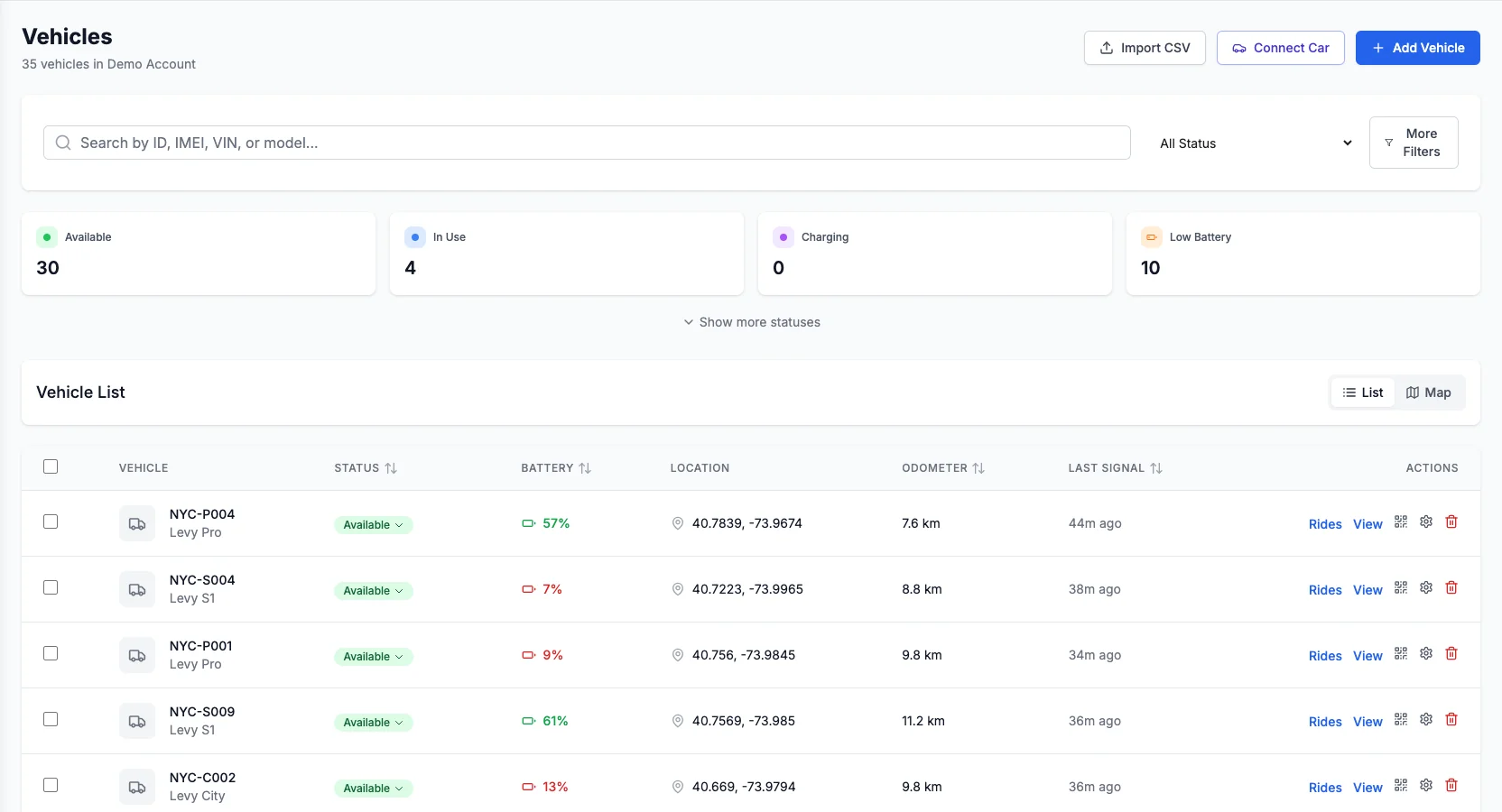
Operator implementation snapshot
The public map and the operator map read the same fleet state.
Operators manage vehicles once inside Levy; the discovery feed reflects those locations, availability states, zones, and pricing plans without a second publishing workflow.
Without the connected workflow
A scheduled export can keep advertising a vehicle after it is reserved, disabled, moved, or low on battery.
With the Levy connection
- Public vehicle IDs remain privacy-safe
- Unavailable vehicles disappear from discovery
- Pricing and zone changes publish from the source of truth
Live vehicle inventory
Live Levy Fleets operator interface
Related Integrations
Walk-up discovery is one half. This is the other.
A GBFS feed reaches the person already standing near your vehicle. It cannot reach the person who booked their week from another continent, because there is nothing on this page to book against. The marketplace channels are the complement: prebooked demand that costs a commission, against inventory Levy holds for them properly.
Expedia Group, Tiqets, Headout, Klook and GetYourGuide all read OCTO, so a single OCTO connection reaches every one of them — one supplier API, one set of product mappings, one money model. Running that alongside your feed is additive, not a trade-off.
Trip-context demand: the vehicle gets booked with the flight and the hotel, months before the traveler lands.
Mobile-ticket buyers in museum quarters and old towns, deciding on the spot and riding within the hour.
A tightly curated, in-destination shelf for the two hours a traveler suddenly has free.
Prebooked demand with its strongest reach across Asia-Pacific travel.
Two-phase booking over the same OCTO standard, covering both the trip planned in advance and the booking made the same day — the demand a map pin never sees.
Hotel demand at the source. Guests already on property book a vehicle and bill it to the room folio — useful in exactly the dense city centres where a GBFS feed also pays off.
Marketplaces, channel managers, property systems and open data feeds — the full list, and which one fits the way you already sell.
See the Google Maps integration in action
Tell us where you operate. We'll show you how your vehicles surface in Google Maps through GBFS.
Levy Fleets is an independent fleet management platform. GBFS and MDS are open specifications; GBFS is stewarded by MobilityData and MDS by the Open Mobility Foundation. Google Maps, Apple Maps, Transit, Citymapper and Lyft are trademarks of their respective owners, and Levy Fleets is not affiliated with, endorsed by, certified by, or partnered with any of them. Publishing a GBFS feed makes your data available to any application that chooses to consume it; each application decides independently whether and when to display a given system, and Levy Fleets cannot guarantee inclusion in any specific app.