.svg)
Ride-hailing by Levy
Launch your own ride-hailing service
A rider app under your brand, a driver app, automatic dispatch, and payments that reconcile themselves. For shuttle services, taxi companies, and new ride-hailing businesses.
- Rider app
- Driver app
- Dispatch console
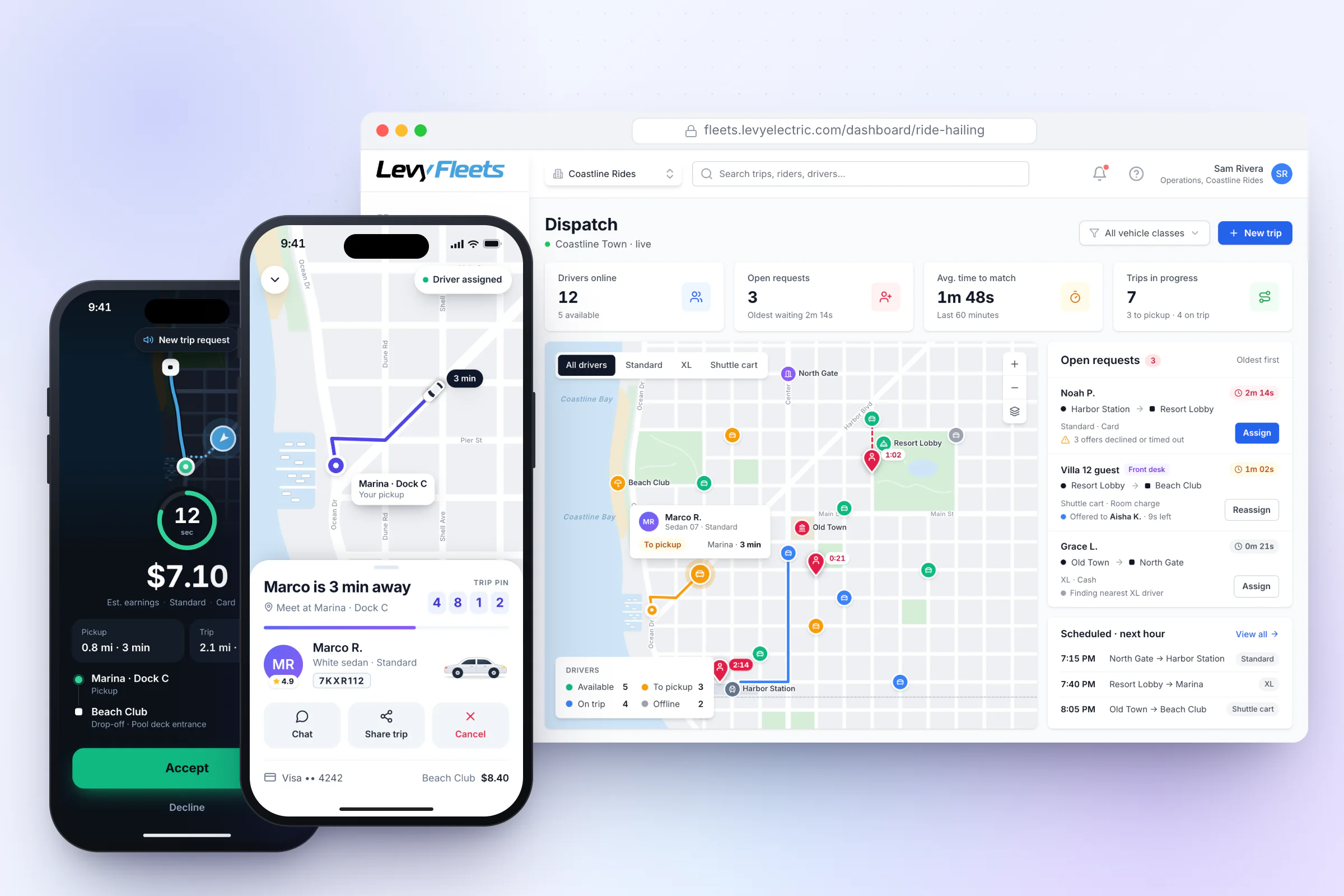
- Rider app
- iOS + Android
- Name, logo, and colors
- Your brand
- Dispatch
- Automatic + manual
- Payments
- Card · Cash · House account
How it works
From request to drop-off.
Rider requests
The rider picks a destination, sees the upfront fare, and requests.
Nearest driver accepts
The closest available driver gets a timed offer and accepts.
Live pickup and trip
The rider watches the driver arrive, shares the trip, and rides.
Fare settles
The card is charged the final fare, or cash or house account is recorded, and the driver’s earnings update.
Rider app
A rider app under your brand
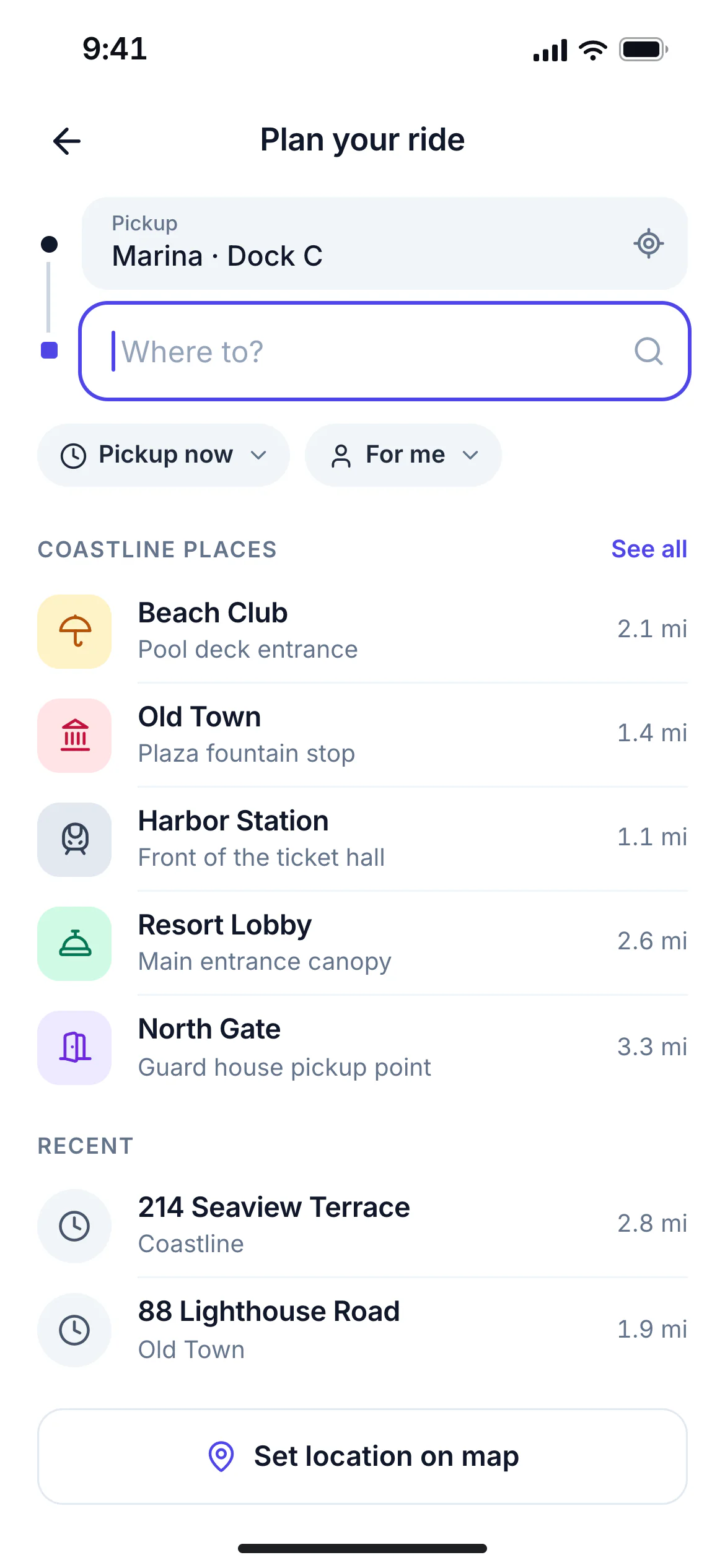
Where to?
Destinations your riders recognize
Named places you define, such as the lobby, the pool, or Gate 3, appear first, followed by address search and a map pin.
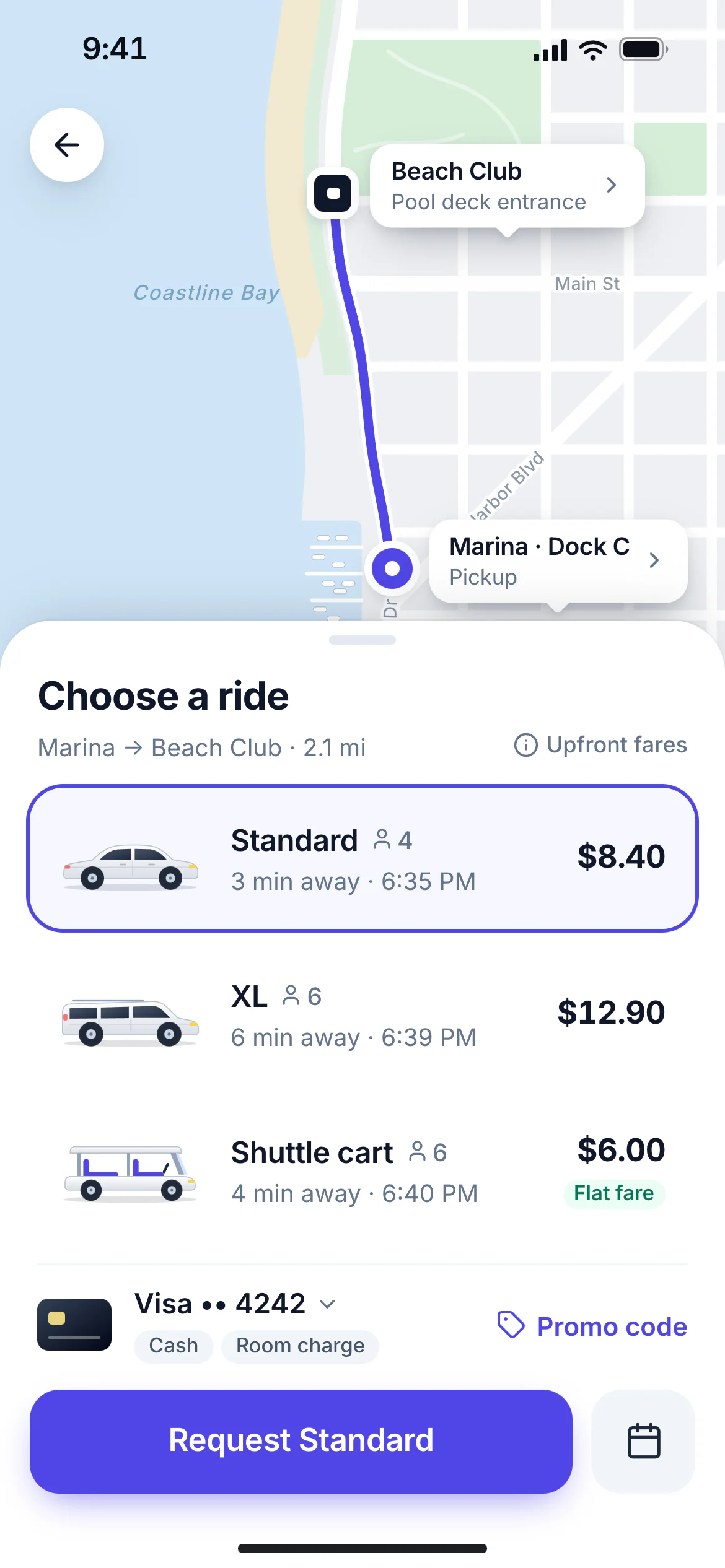
Choose a ride
Upfront fare before they request
Every vehicle class shows its fare and pickup ETA. Riders pick a payment method and add a promo code before requesting.
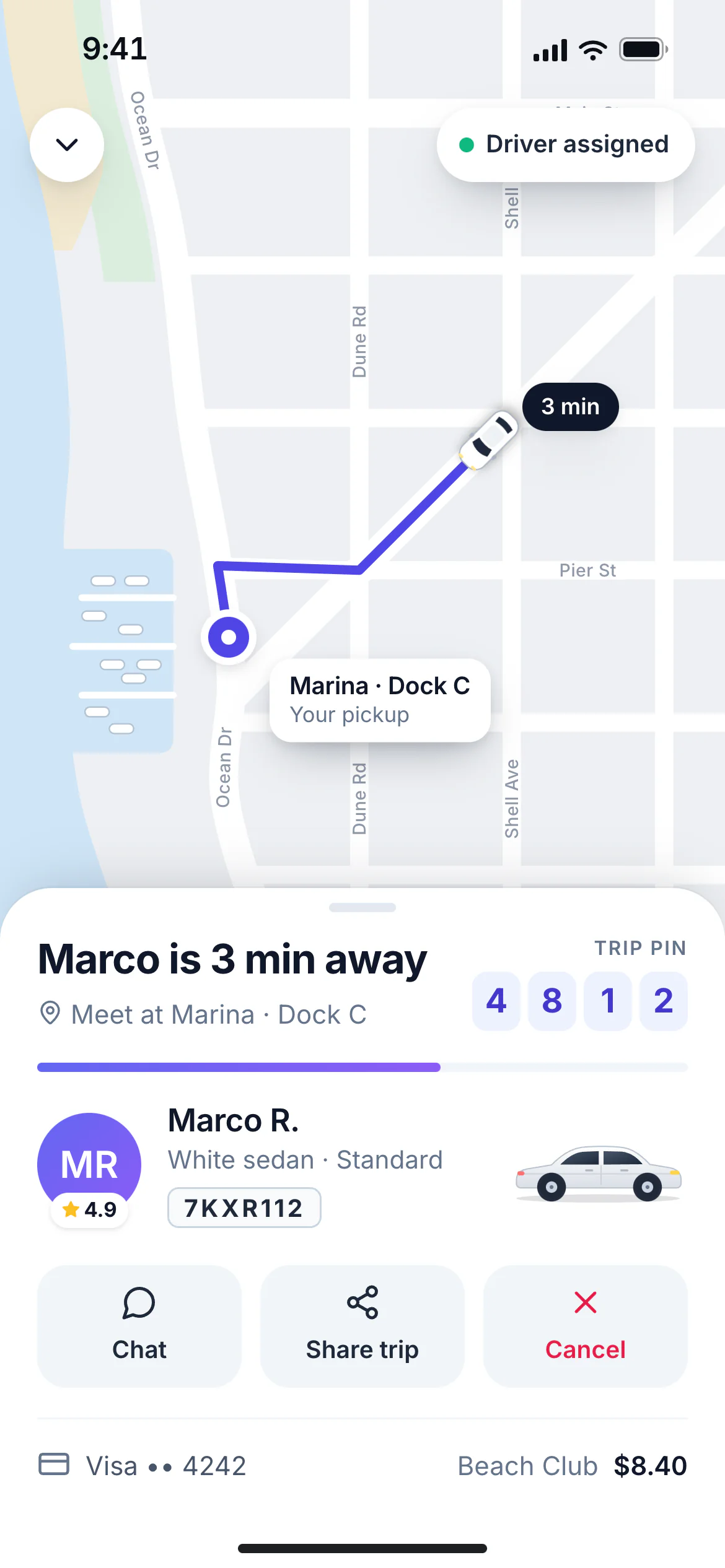
Driver on the way
Live driver position and ETA
Riders see the driver, vehicle, plate or cart number, live position, and a trip PIN, with chat and trip sharing a tap away.
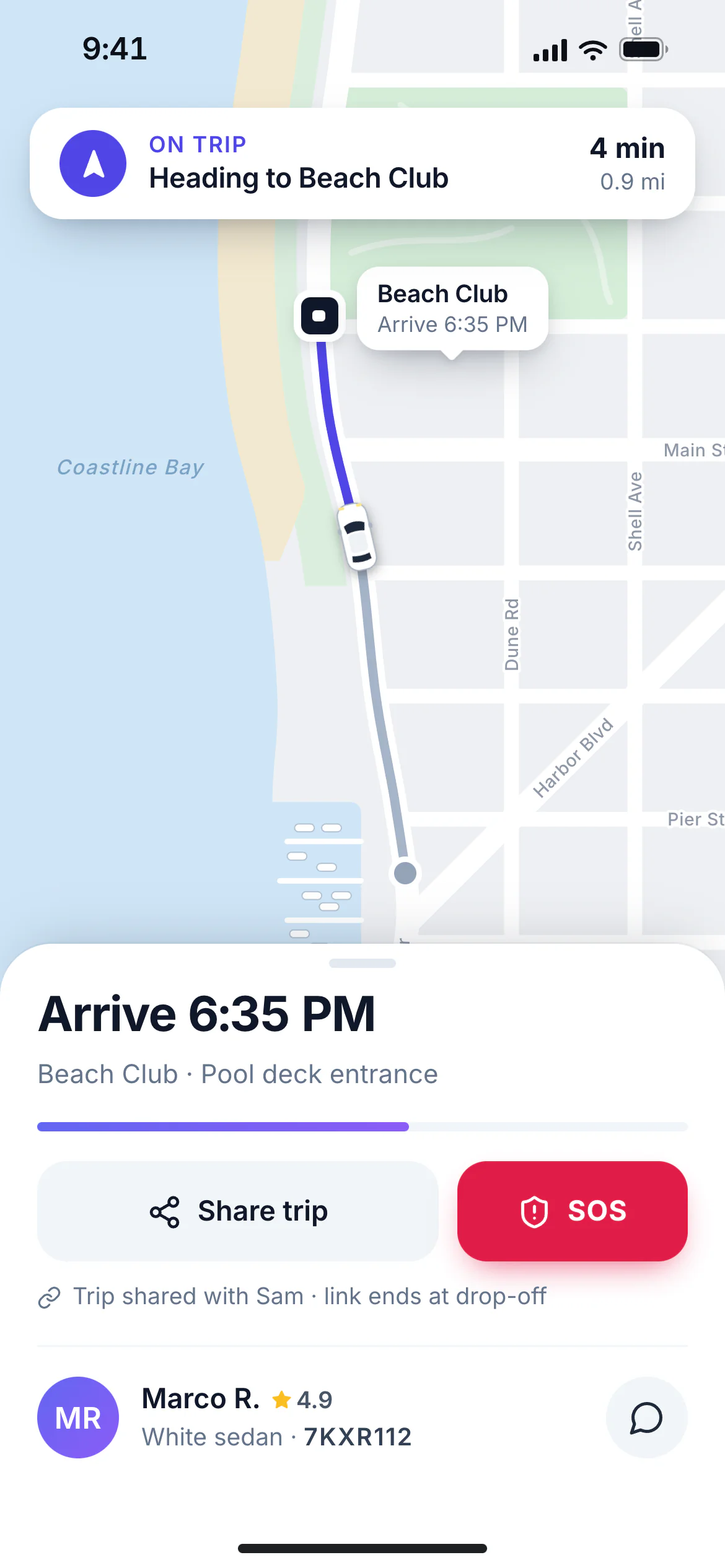
In trip
Share trip and SOS built in
The route and arrival time stay on screen, with a share-my-trip link for friends and an SOS button that alerts your team.
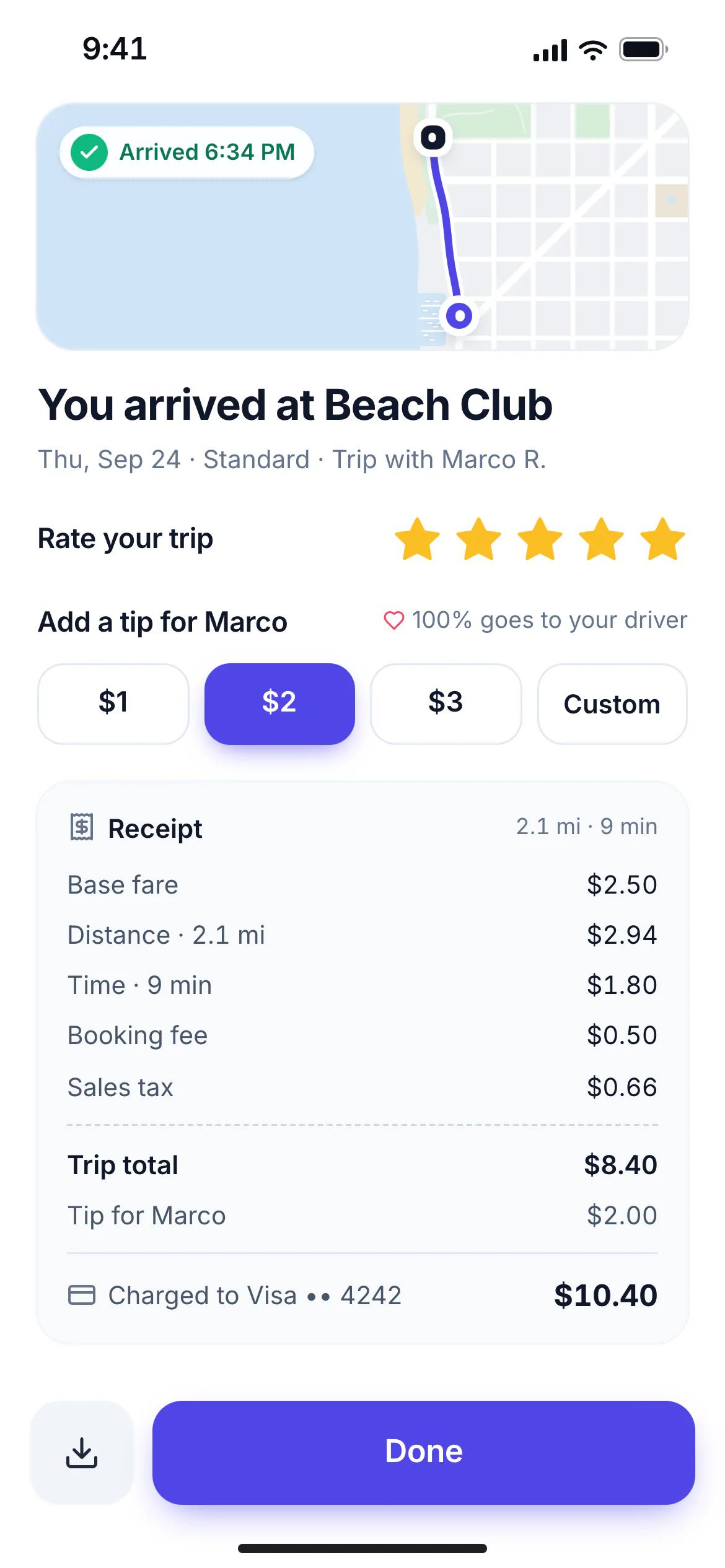
Receipt
Rate, tip, and a clear receipt
Riders rate the trip, add a tip that goes entirely to the driver, and get an itemized receipt.
Your brand, your store listing
Riders book in an iOS and Android app with your name, logo, and colors.
Named places first
Define pickup and drop-off points like "Lobby" or "Villa 12" so riders never type an address on your property.
Upfront fares
Riders see the fare and pickup ETA for every vehicle class before they request.
Live driver tracking
Driver photo, vehicle, plate or cart number, live position, and ETA from assignment to drop-off.
Scheduled rides
Riders can book ahead. The trip is dispatched automatically before pickup time.
In-app chat and masked calling
Riders and drivers can reach each other without seeing each other’s phone numbers.
Ratings and tips
Two-way ratings after every trip. Tips go entirely to the driver.
Web booking
A booking widget for your website, so riders can request a ride without installing the app.
Driver app
A driver app built for shifts
Drivers need an app that is fast to use between trips. Levy Driver shows the next trip, gets them there, and keeps their earnings clear.
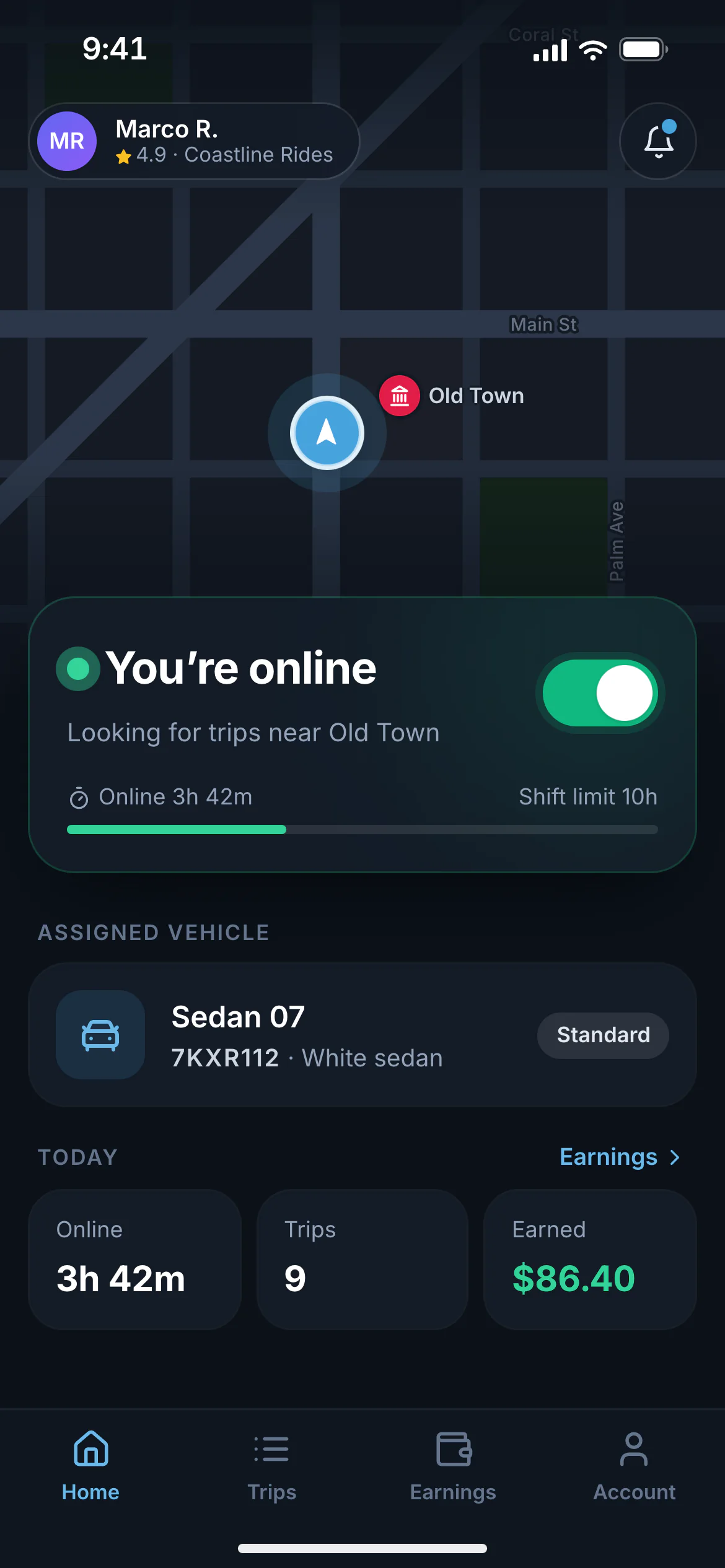
Go online
One tap to start a shift
Drivers go online in the vehicle you assigned them and see hours and earnings for the day.
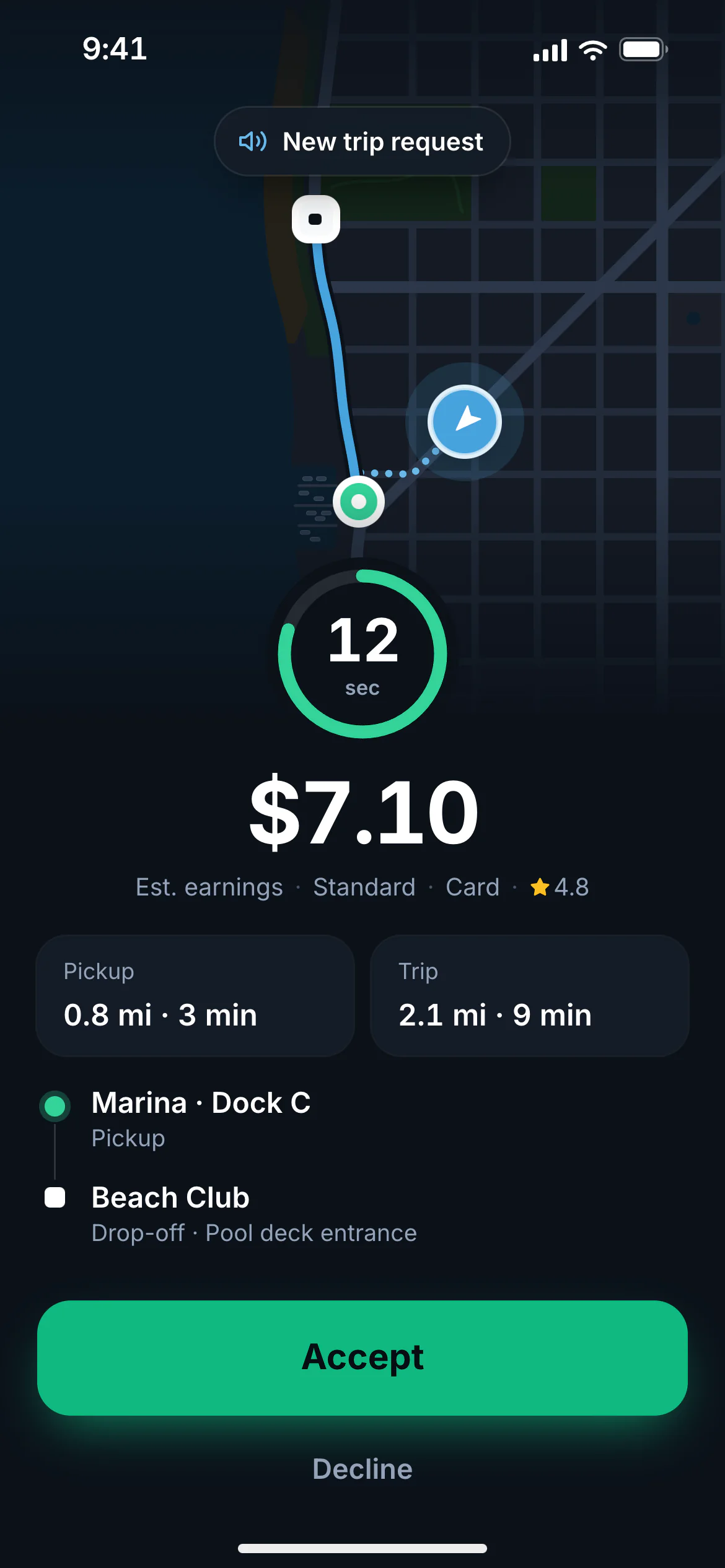
Trip offer
Offers with a countdown
Each offer shows pickup distance, pickup and drop-off, and earnings. If the driver doesn’t accept in time, it moves to the next nearest driver.
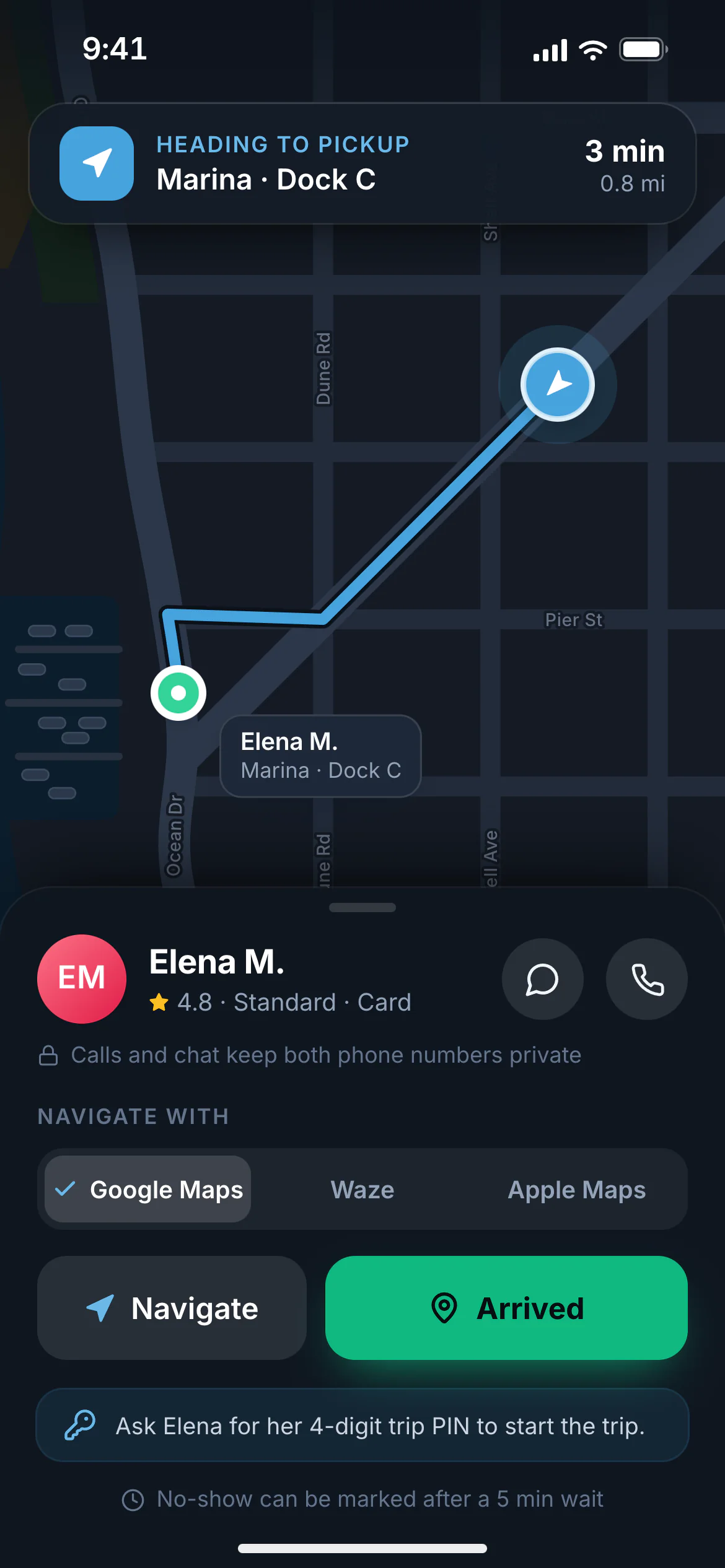
To pickup
Navigate in the app drivers already use
One tap opens Google Maps, Waze, or Apple Maps. Drivers mark arrival, check the rider’s PIN, and start the trip.
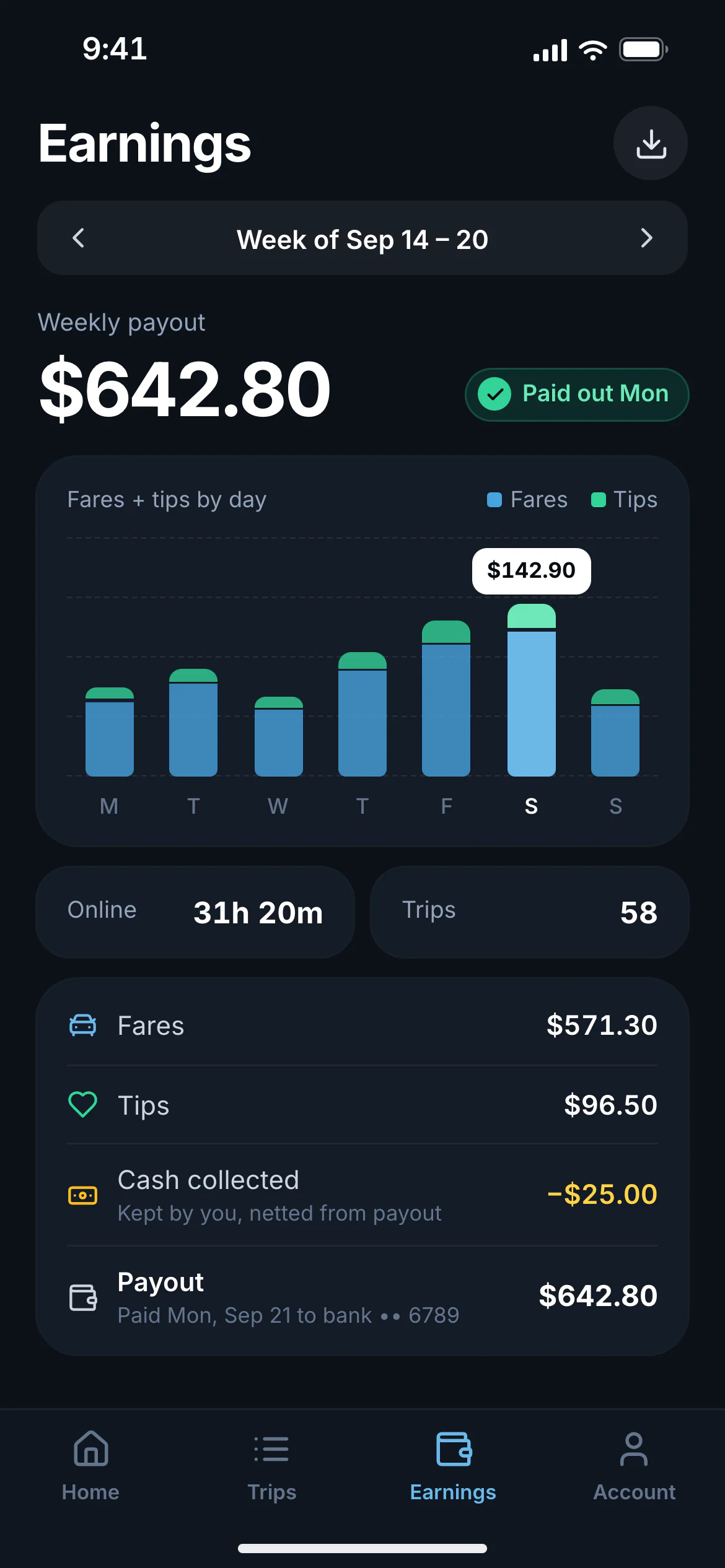
Earnings
Earnings drivers can check
Fares, tips, cash collected, and payout status by day and week.
Join with a code
Drivers download the Levy Driver app, join your service with an invite code, and upload their documents.
Go online in one tap
Drivers start a shift in the vehicle you assigned. Location sharing runs only while they are online.
Offers with a countdown
Full-screen offers show pickup distance, route, and earnings, with sound and vibration.
Navigation handoff
One tap opens Google Maps, Waze, or Apple Maps for pickup and drop-off.
Arrive, verify, start
Drivers mark arrival, enter the rider’s trip PIN if you require one, and start the trip.
No-show handling
After the wait time you set, drivers can mark a no-show and your no-show fee applies.
Earnings and cash
Fares, tips, and cash collected by day and week, with payout status.
Dispatch
Automatic dispatch, with a human override
Automatic dispatch handles the everyday requests. Your dispatchers handle the exceptions, with every driver, trip, and delay on one screen.
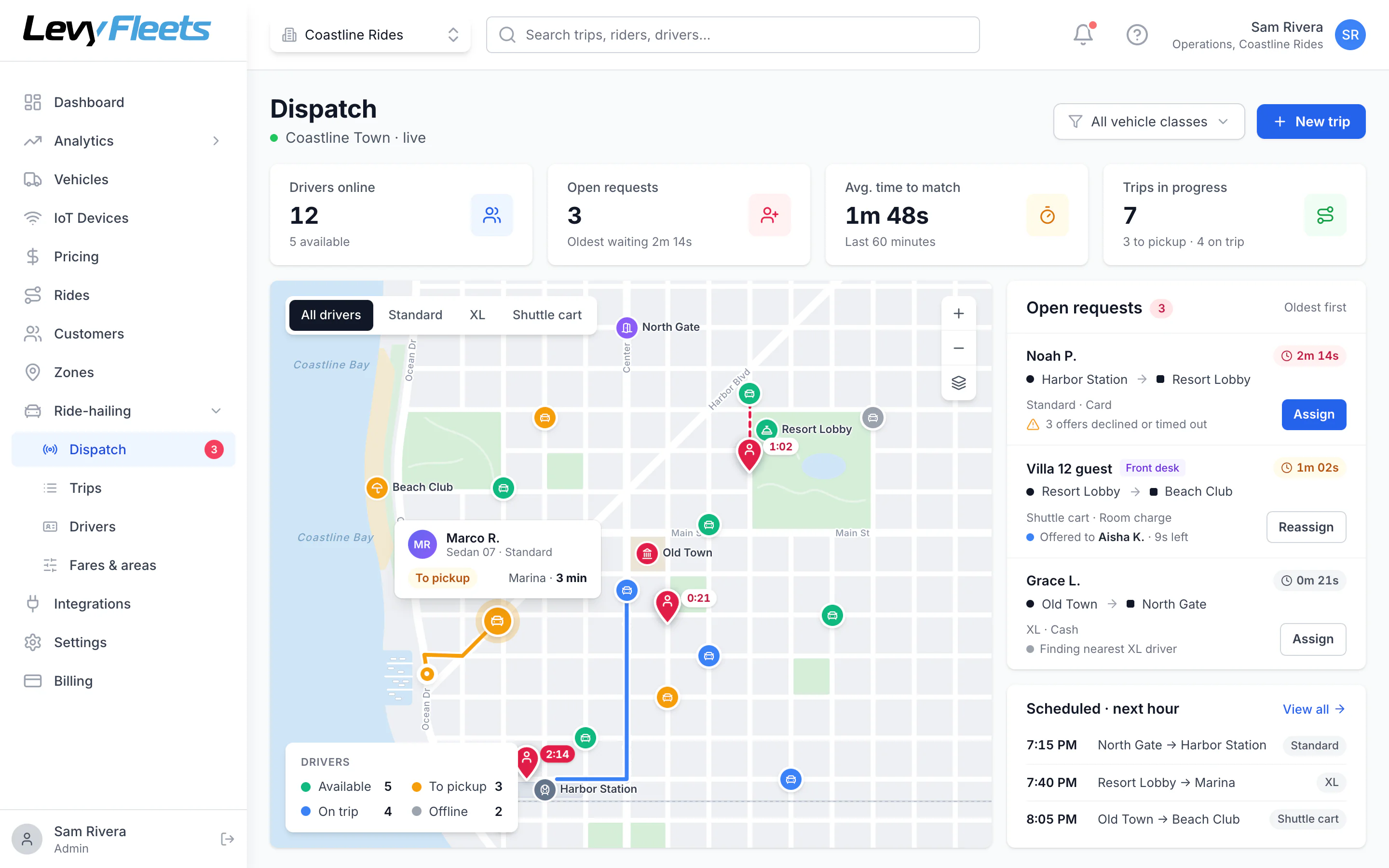
Dispatch console
Every driver and trip on one map
Drivers are color-coded by status, open requests queue by age, and dispatchers can assign or reassign any trip by hand.
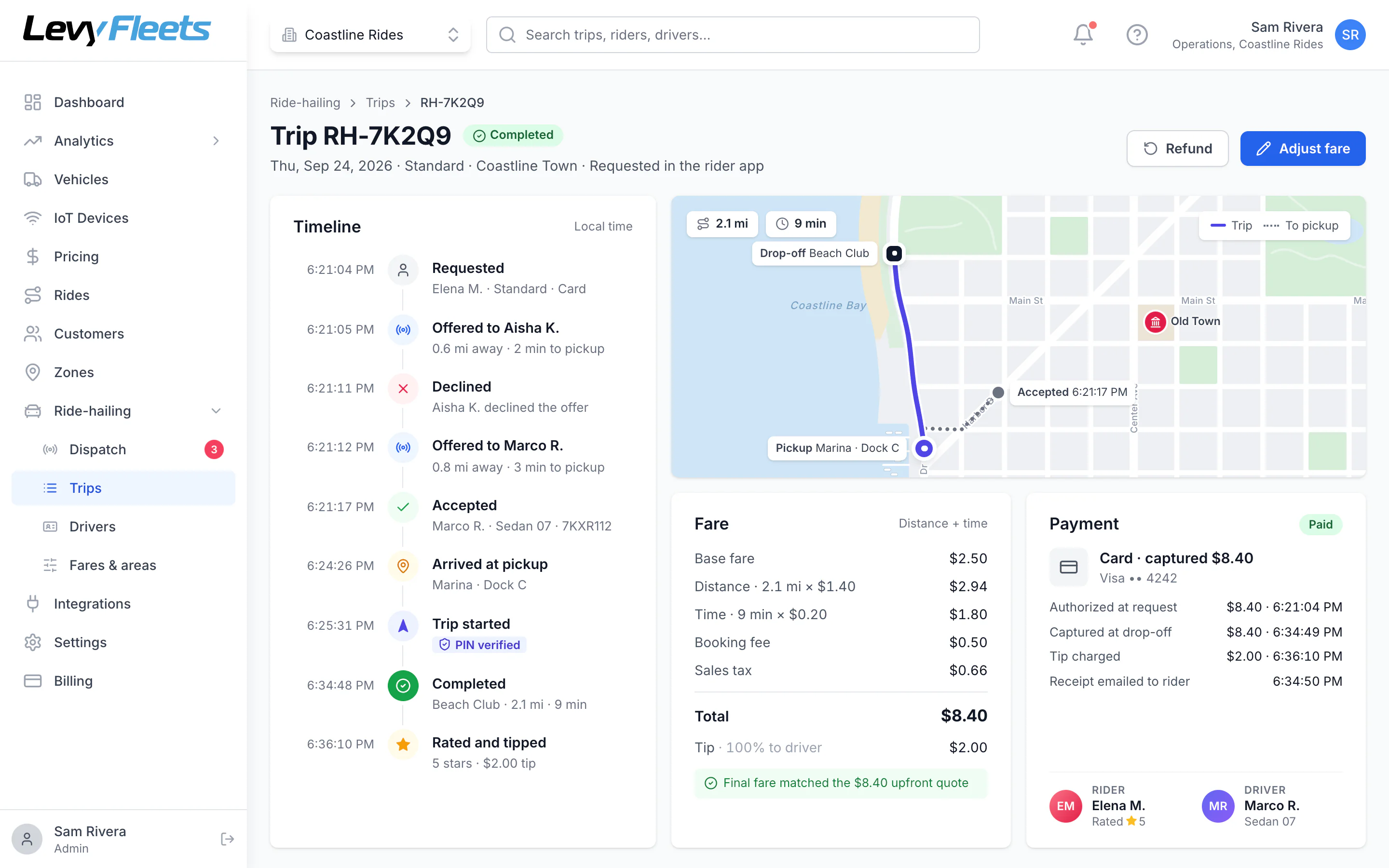
Trip timeline
The full story of every trip
Who was offered the trip, who accepted, arrival, pickup, and drop-off, all timestamped, with the route and fare breakdown.
Nearest-driver matching
Requests go to the available driver with the shortest pickup time in the right vehicle class.
One offer at a time
If a driver declines or doesn’t respond in time, the trip goes to the next best driver automatically.
Never double-booked
A trip can only be accepted by one driver, even if two tap at the same moment.
Manual assign and reassign
Dispatchers can send any trip to a specific driver, move it, or cancel it from the console.
Phone and front-desk bookings
Staff can create a trip for a caller or a guest at the desk.
Driver cancellations recover themselves
If a driver cancels, the trip goes back to the front of the queue.
Fares
Fares for every kind of service
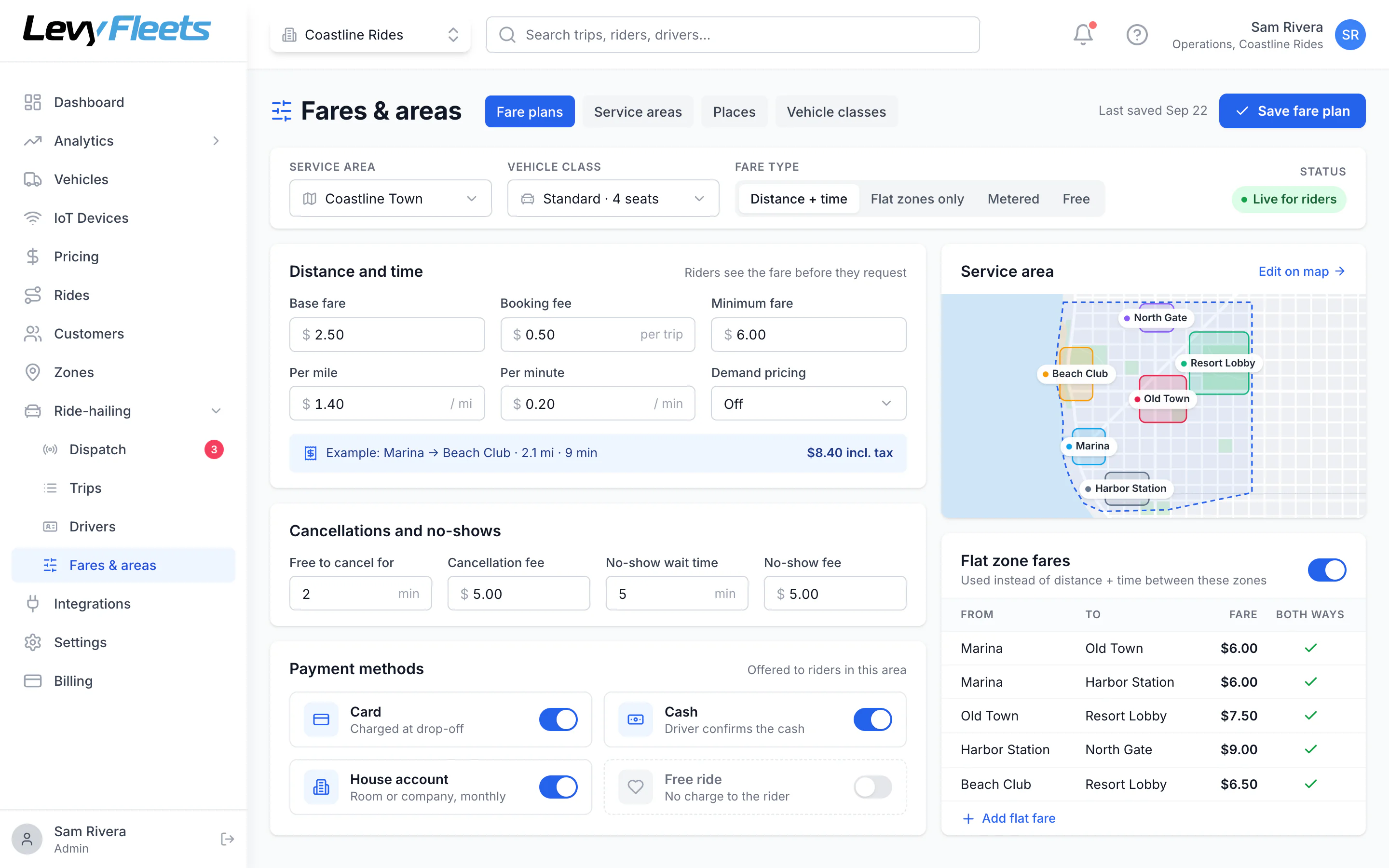
Base plus distance and time, flat zone-to-zone fares, minimum fares, cancellation and no-show fees, or free rides, set per service area and vehicle class.
Base, distance, and time
Set a base fare, booking fee, per-mile or per-km rate, per-minute rate, and a minimum fare.
Flat zone fares
Charge a fixed price between zones, which suits resorts, compounds, campuses, and airport runs.
Metered fares
Use a taximeter-style fare where your market requires it.
Demand pricing
Optional surge multipliers with a cap you set, always shown to the rider before they request.
Cancellation and no-show fees
A free cancellation window, then a fee. A separate fee when riders don’t show up.
Free and sponsored rides
Run a free shuttle for guests, residents, or students and still get full trip reporting.
Per area and vehicle class
Different fares for each service area and each vehicle class.
Payments
Get paid the way your riders pay
Cards with an upfront hold
Card payments are authorized when the rider requests and charged the final fare when the trip ends.
Cash
Drivers confirm cash collected. Cash held by each driver is tracked for you to reconcile.
House accounts
Bill trips to a room, a residence, or a company account and invoice monthly.
Driver payouts
Pay contractor drivers weekly through Stripe Connect, with cash and tips netted automatically.
Payroll export
Export hours and earnings for employed drivers.
Refunds and fare adjustments
Refund or correct any fare from the trip, with tax and reporting updated.
Safety
Safety features riders expect
Trip PIN
An optional four-digit code the rider gives the driver before the trip can start.
Share my trip
A live link showing the driver, vehicle, and route that expires after the trip.
SOS button
In both apps. It dials the local emergency number and alerts your team with the trip location.
Driver verification
Identity and driver’s license checks, document expiry reminders, and background-check support in the US.
Shift limits
Cap the hours a driver can stay online in a day.
Trip records
Timestamped records of when drivers were online, heading to pickup, and on a trip, ready for your insurer.
Operations
Run the service from one dashboard
Drivers
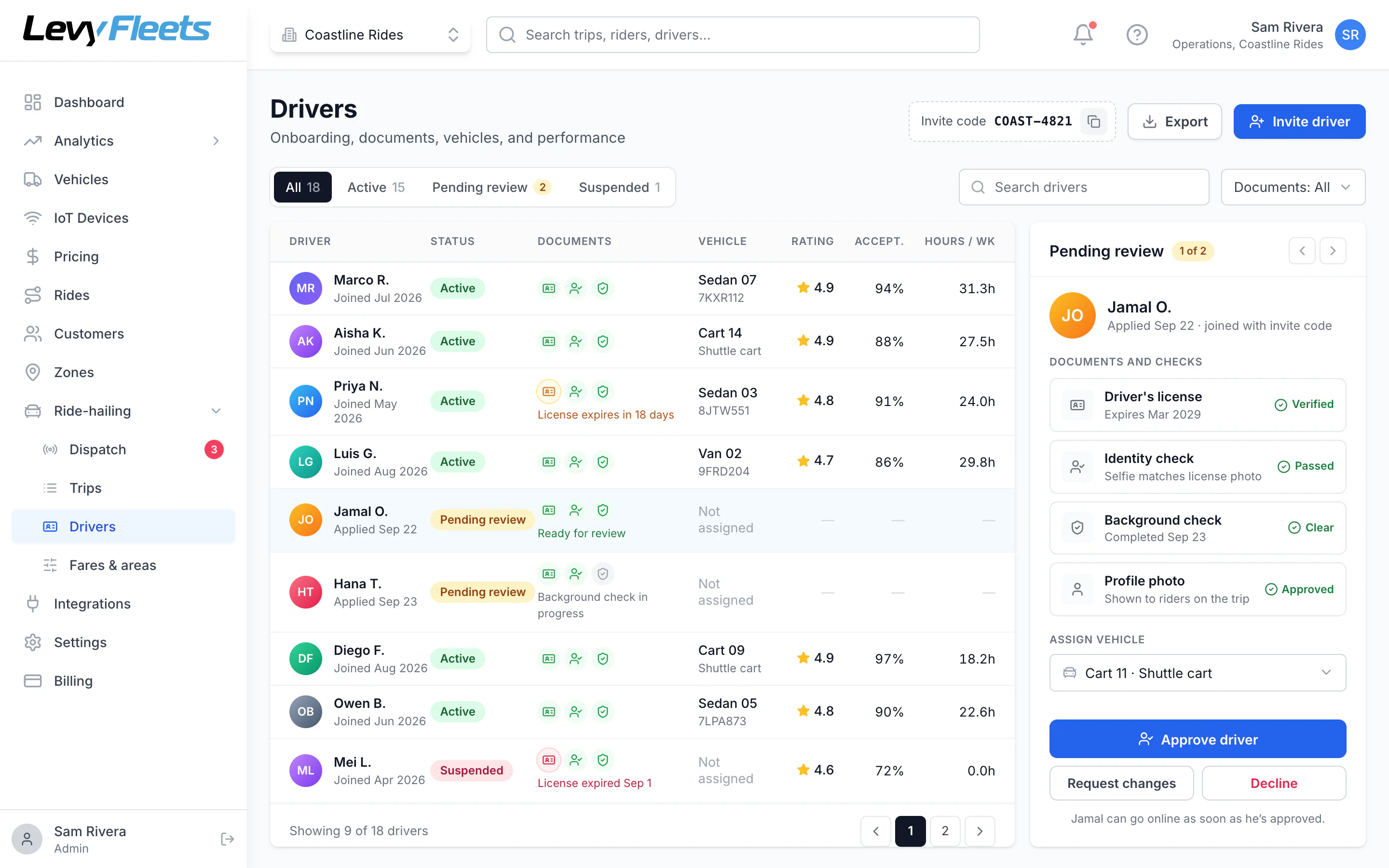
Onboard and manage drivers
Review documents and identity checks, approve or suspend drivers, assign vehicles, and track hours, acceptance, and ratings.
Service areas and places
Draw service areas, fare zones, and pickup points on the map.
Vehicle classes
Offer different vehicle types, such as a 4-seat cart, a 6-seat cart, a sedan, or an XL.
Driver management
Onboarding review, document checks, approvals, suspensions, and vehicle assignment.
Trip timeline
Every offer, acceptance, arrival, and fare change on a timestamped timeline.
Reports
Trips, completion rate, time to match, pickup accuracy, cancellations, revenue by payment type, and driver earnings.
Works with the rest of Levy
The same dashboard runs your rentals, car sharing, and IoT-connected vehicles.
Built for
Set up for the service you run.
- On-demand shuttles
Resort and community shuttles
Let guests and residents request a golf cart or shuttle from their phone. Named pickup points, flat or free fares, room charges, and a dispatch console for your team.
Learn more - Campus transportation
Campus safe rides
Run an on-demand campus shuttle or late-night safe-ride program. Students request from their phone, share their trip, and see the driver coming. Free or fare-based.
Learn more - Taxi companies
Taxi dispatch software
Move your taxi company from radio dispatch to automatic dispatch. A branded booking app, a driver app, metered or upfront fares, cash and card payments, and a dispatch console.
Learn more - Launch your own service
White-label ride-hailing app
Launch a ride-hailing service under your own brand without building the software. Rider app, driver app, dispatch, fares, payments, and driver payouts in one platform.
Learn more - Levy Driver
Driver app
The Levy Driver app lets your drivers go online, accept trip offers, navigate with Google Maps, Waze, or Apple Maps, and track earnings. Built for employed and contractor drivers.
Learn more - Dispatch console
Dispatch software
Automatic nearest-driver dispatch with a live console for your team. See every driver and trip on one map, assign or reassign by hand, and review a full timeline of every trip.
Learn more
FAQ
Common questions.
What is included in Levy ride-hailing?
A rider app under your brand, the Levy Driver app, a dispatch console, fare and payment setup, driver management, and reporting. Riders request a ride, the nearest available driver gets the offer, and the fare settles automatically.
Can we use our own drivers and vehicles?
Yes. You can run employed drivers in your own fleet vehicles, contractor drivers in their own cars, or both. You assign vehicles and approve every driver.
How does dispatch work?
Each request goes to the available driver with the shortest pickup time in the right vehicle class. If they decline or don’t respond in time, it moves to the next driver. Dispatchers can also assign or reassign trips by hand.
How are fares set?
You choose per service area and vehicle class: base plus distance and time, flat zone-to-zone fares, metered fares, or free rides. You also set minimum fares, cancellation and no-show fees, and optional demand pricing.
Which payment methods are supported?
Cards through Stripe, cash collected by the driver, house accounts billed monthly, and free or sponsored rides. Riders can tip drivers in the app.
How do drivers get paid?
Contractor drivers can be paid weekly through Stripe Connect, with tips and cash netted automatically. For employed drivers, you export hours and earnings for payroll.
Does it work on private property like resorts, compounds, and campuses?
Yes. Define a service area and named pickup points, set flat or free fares, and run golf carts, low-speed vehicles, vans, or cars.
Who handles licensing and insurance?
You do. As the operator you are the transportation provider and hold the licenses and insurance your market requires. Levy provides the software. The app records the trip and online-time data your insurer may ask for.
Can it run alongside our rentals or car sharing?
Yes. Ride-hailing runs in the same Levy dashboard as vehicle sharing, rentals, and car sharing, with shared reporting and payouts.
Launch ride-hailing under your brand.
Tell us about your service, your drivers, and your vehicles, and we’ll walk you through the rider app, driver app, and dispatch console.
Launch ride-hailing with Levy
Tell us about your service, your drivers, and your vehicles. We'll walk you through the rider app, driver app, and dispatch console.
Keep exploring
Related products
Golf Cart Fleet Management
Keyless start, geofences, and full ride history for resort, campus, and community cart fleets.
Learn moreCar Sharing Software
White-label apps, keyless access, payments, and ID verification for a self-drive car fleet.
Learn moreMoped Share Platform
Software and connected hardware for shared electric mopeds, with a branded rider app.
Learn more