.svg)
Levy Driver
A driver app for ride-hailing and shuttle operators
Drivers need an app that is fast to use between trips. Levy Driver shows the next trip, gets them there, and keeps their earnings clear.
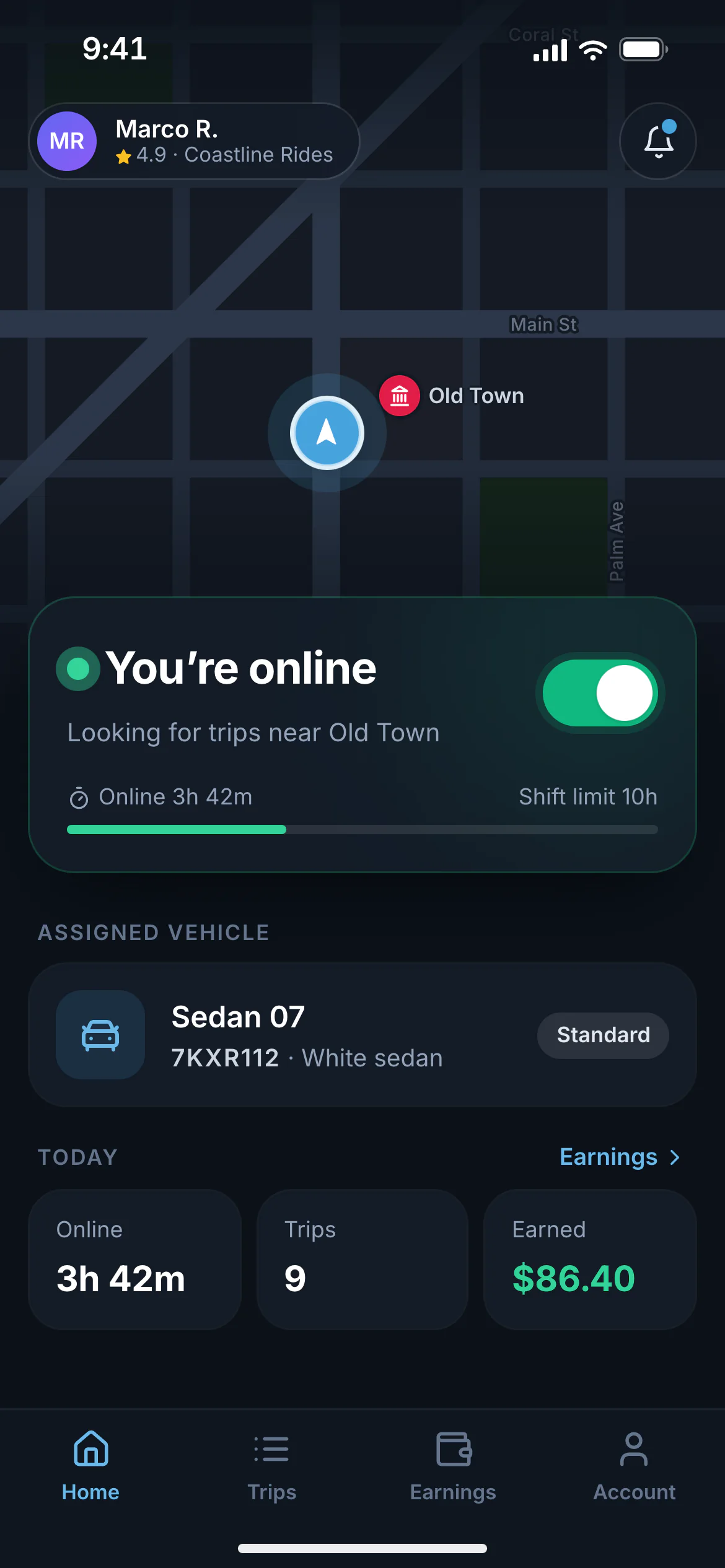
Go online
One tap to start a shift
Drivers go online in the vehicle you assigned them and see hours and earnings for the day.
Who it’s for
Built for teams that move people.
- Employed shuttle and taxi drivers
- Contractor ride-hailing drivers
- Resort, campus, and community drivers
The problem
What gets in the way today.
Offers get missed
A text or radio call is easy to miss. Drivers need a clear offer with a timer.
Navigation is a separate app
Drivers already know their navigation app, so the driver app should hand off to it.
Earnings are unclear
Drivers want to see fares, tips, and cash at a glance.
How it works
What happens, step by step.
Join your service
Drivers download Levy Driver and join with your invite code.
Get approved
They upload a license and documents and complete identity verification.
Go online
They start a shift in the vehicle you assigned and receive offers.
Drive and get paid
Accept, navigate, pick up, drop off, and see earnings update.
Features
What you get with Levy.
Driver app
A driver app built for shifts
Join with a code
Drivers download the Levy Driver app, join your service with an invite code, and upload their documents.
Go online in one tap
Drivers start a shift in the vehicle you assigned. Location sharing runs only while they are online.
Offers with a countdown
Full-screen offers show pickup distance, route, and earnings, with sound and vibration.
Navigation handoff
One tap opens Google Maps, Waze, or Apple Maps for pickup and drop-off.
Arrive, verify, start
Drivers mark arrival, enter the rider’s trip PIN if you require one, and start the trip.
No-show handling
After the wait time you set, drivers can mark a no-show and your no-show fee applies.
Earnings and cash
Fares, tips, and cash collected by day and week, with payout status.
Safety
Safety features riders expect
Trip PIN
An optional four-digit code the rider gives the driver before the trip can start.
Share my trip
A live link showing the driver, vehicle, and route that expires after the trip.
SOS button
In both apps. It dials the local emergency number and alerts your team with the trip location.
Driver verification
Identity and driver’s license checks, document expiry reminders, and background-check support in the US.
Shift limits
Cap the hours a driver can stay online in a day.
Trip records
Timestamped records of when drivers were online, heading to pickup, and on a trip, ready for your insurer.
Payments
Get paid the way your riders pay
Cards with an upfront hold
Card payments are authorized when the rider requests and charged the final fare when the trip ends.
Cash
Drivers confirm cash collected. Cash held by each driver is tracked for you to reconcile.
House accounts
Bill trips to a room, a residence, or a company account and invoice monthly.
Driver payouts
Pay contractor drivers weekly through Stripe Connect, with cash and tips netted automatically.
Payroll export
Export hours and earnings for employed drivers.
Refunds and fare adjustments
Refund or correct any fare from the trip, with tax and reporting updated.
Screens
A closer look.
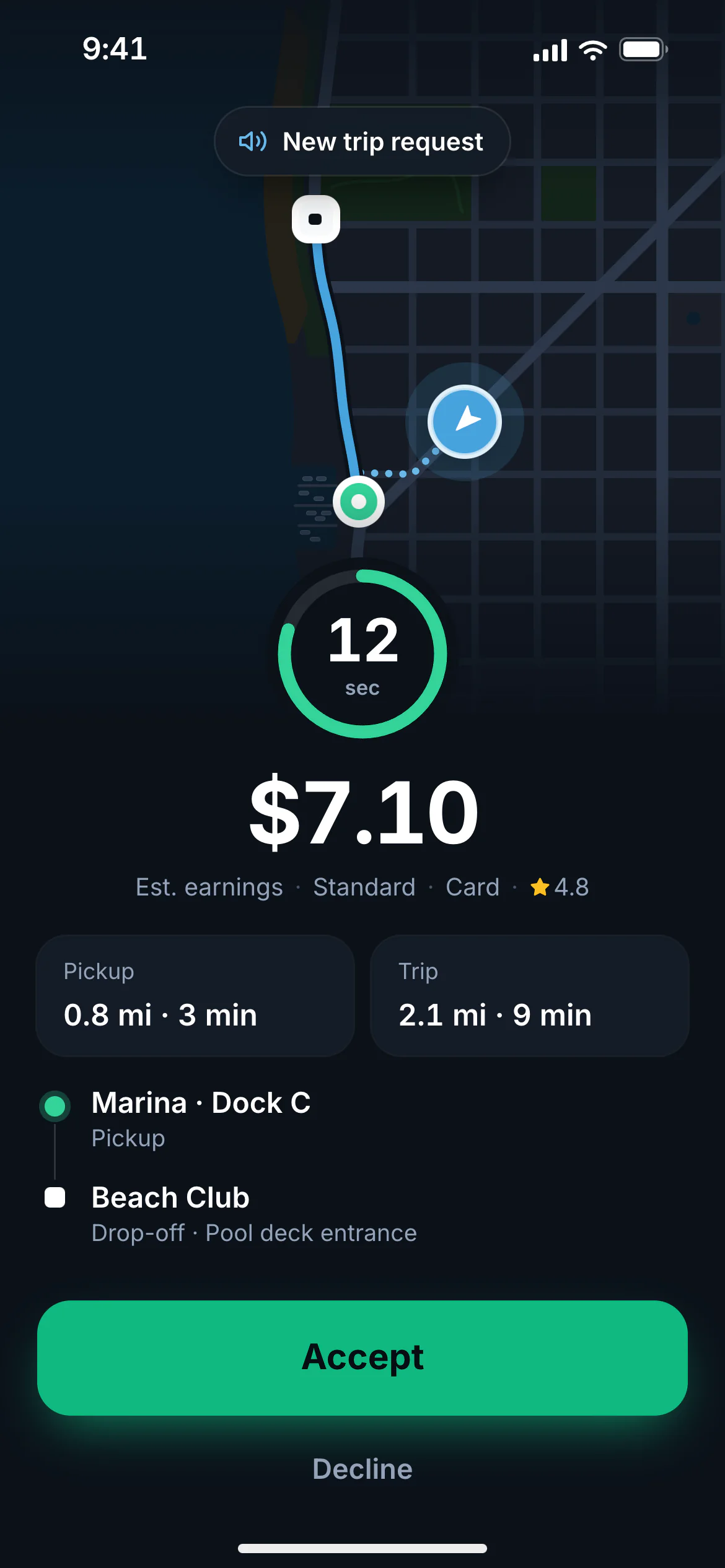
Trip offer
Offers with a countdown
Each offer shows pickup distance, pickup and drop-off, and earnings. If the driver doesn’t accept in time, it moves to the next nearest driver.
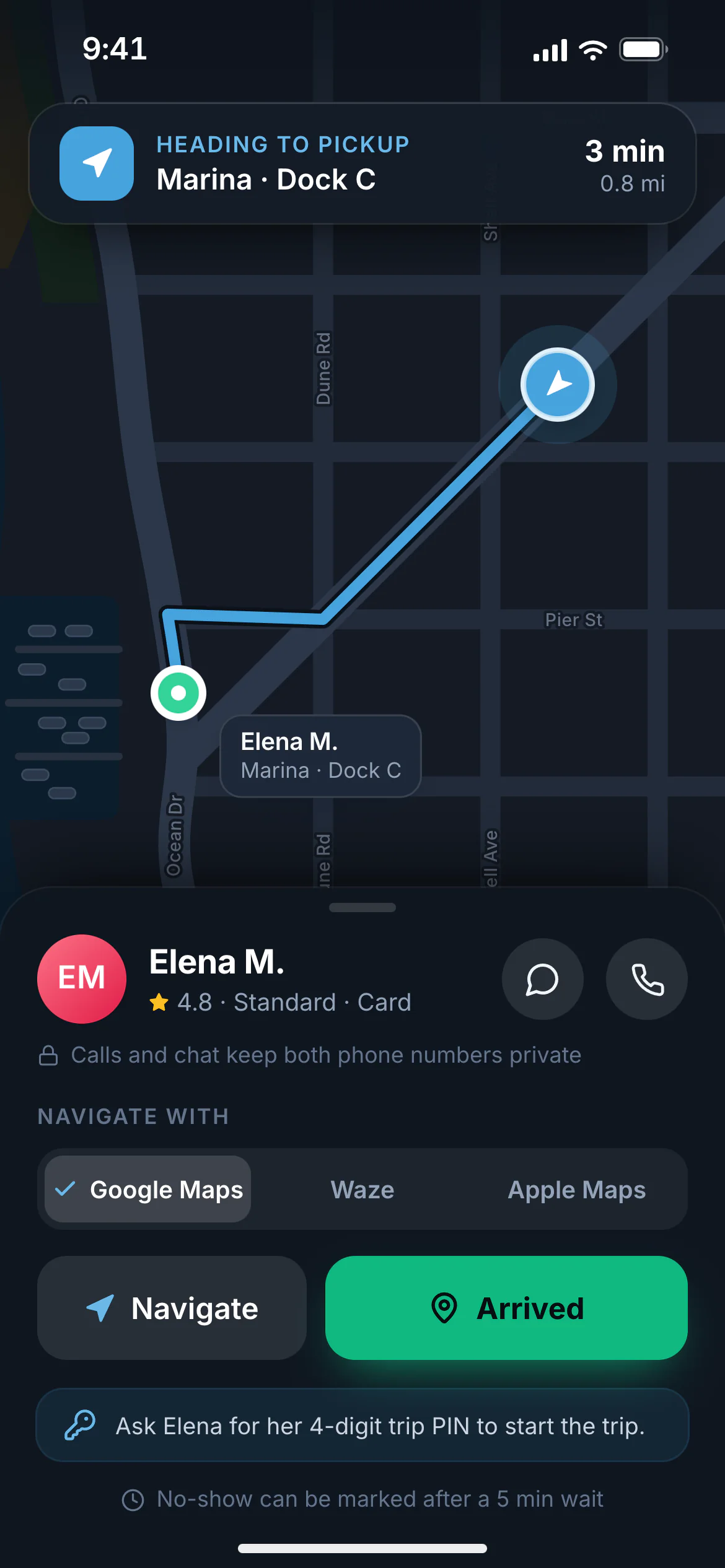
To pickup
Navigate in the app drivers already use
One tap opens Google Maps, Waze, or Apple Maps. Drivers mark arrival, check the rider’s PIN, and start the trip.
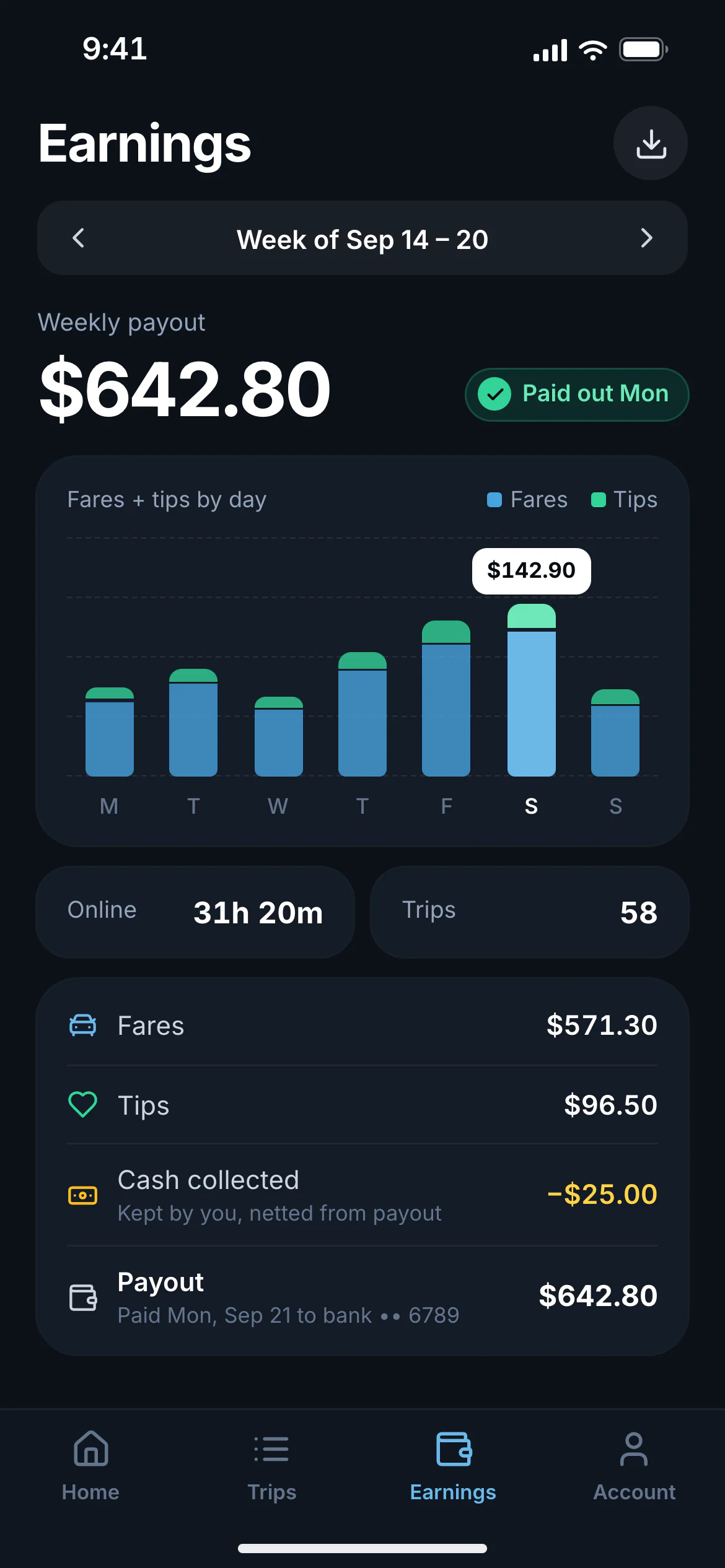
Earnings
Earnings drivers can check
Fares, tips, cash collected, and payout status by day and week.
Driver app FAQ
Common questions.
Does the driver app track location all the time?
No. Location is shared only while the driver is online.
Which navigation apps does it work with?
Google Maps, Waze, and Apple Maps.
Can a driver work for more than one operator?
Yes. Each operator approves the driver separately.
Keep exploring
More on Levy ride-hailing.
- Dispatch console
Dispatch software
Automatic nearest-driver dispatch with a live console for your team. See every driver and trip on one map, assign or reassign by hand, and review a full timeline of every trip.
Learn more - Launch your own service
White-label ride-hailing app
Launch a ride-hailing service under your own brand without building the software. Rider app, driver app, dispatch, fares, payments, and driver payouts in one platform.
Learn more - Taxi companies
Taxi dispatch software
Move your taxi company from radio dispatch to automatic dispatch. A branded booking app, a driver app, metered or upfront fares, cash and card payments, and a dispatch console.
Learn more - Ride-hailing by Levy
Platform overview
Everything a ride-hailing service runs on, under your brand.
See the full platform
See how it would work for your service.
Tell us about your service, your drivers, and your vehicles, and we’ll walk you through the rider app, driver app, and dispatch console.
Launch ride-hailing with Levy
Tell us about your service, your drivers, and your vehicles. We'll walk you through the rider app, driver app, and dispatch console.