How to Get the Robot ID and Serial Number of the S1
The Robot ID (also called the Serial Number or SN) is required for registering your S1 in the management system, contacting support, and ordering replacement parts.
Finding the Robot ID
The robot ID can be found on the S1 robot itself. The following images show where to locate the ID label:
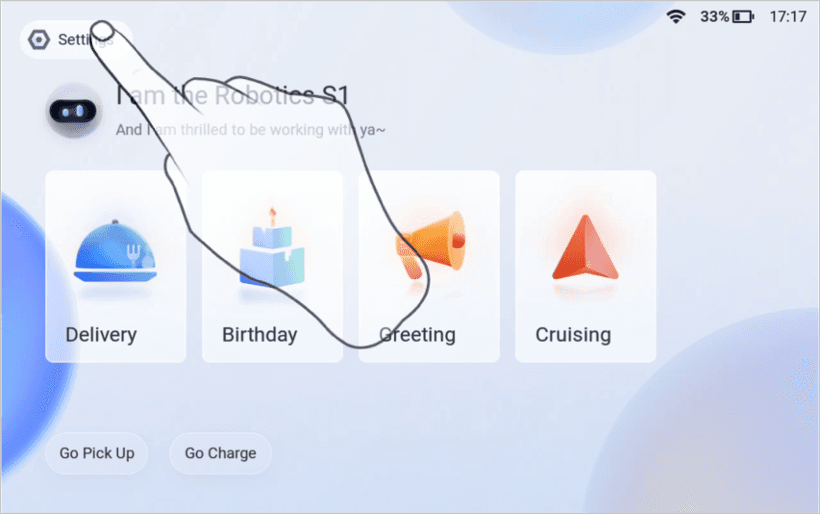
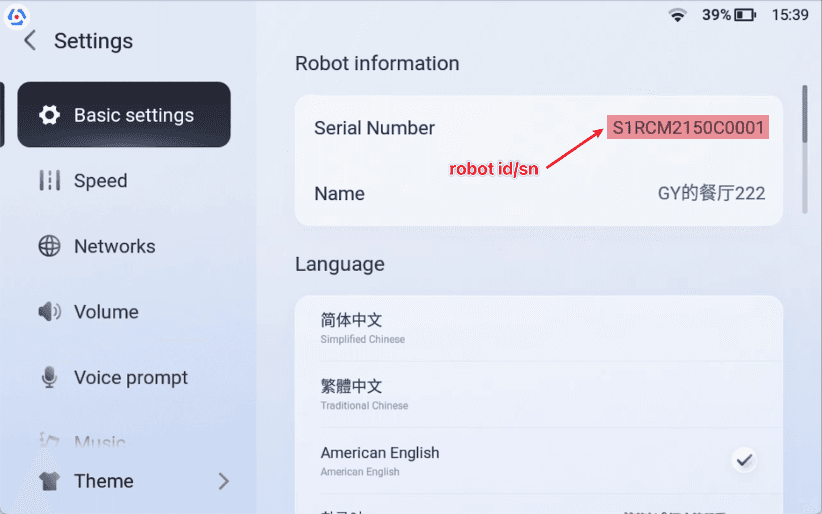
The ID is typically printed on a label attached to the robot body. It may also be accessible through the robot's settings menu on the touchscreen interface.
Format
The S1's Robot ID/SN is typically a combination of letters and numbers (e.g., S1XXXXXXXXXXXXXXX).
When You Need the Robot ID
- When registering the robot in the Segway management platform
- When contacting Segway support for troubleshooting
- When ordering replacement parts or accessories
- When installing software updates that require device identification
Running a fleet on this hardware?
Levy Fleets runs scooters, e-bikes, mopeds and golf carts on the IoT hardware you already have, with integration pages for 29 vendors including Segway, Okai, Omni, Queclink, Invers and Comodule. Keyless unlock, geofencing, rider payments and rider support are included, and the Managed plan is a share of revenue with no per-vehicle software fee.