SIM Card Not Detected in Internal or Queclink IoT
If the scooter is offline and you cannot read the ICCID from the IoT module, the IoT may not be detecting the SIM card. This can happen when the SIM card slot's spring pin loses contact.
Symptoms
- Scooter offline despite correct IP/APN settings
- ZK600 or other diagnostic tool shows blank ICCID
- IoT is powering on but not registering on the cellular network
Fix 1: Adjust the SIM Pin
Watch this video for a demonstration of how to adjust the SIM card slot pin:
The pin in the SIM card tray can be gently bent slightly upward to improve contact with the SIM card. Be careful not to bend it too far or break it.
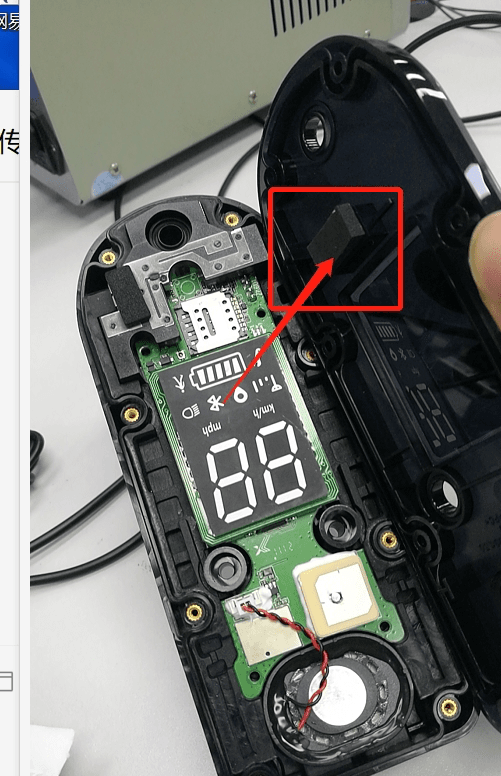
Fix 2: Add a Cushion to the IoT Cover
If the SIM pin adjustment alone does not help, adding a small piece of foam or rubber as a cushion under the IoT cover can apply additional pressure to the SIM card, improving contact.
Steps
- Open the dashboard or IoT housing to access the IoT module
- Remove the SIM card and inspect it for damage or corrosion
- Re-seat the SIM card carefully, ensuring it is fully inserted
- If the slot pin looks flat or worn, gently lift it slightly
- If needed, place a thin foam pad (1-2mm) between the IoT module and its cover before closing
- Reassemble and check if the ICCID is now readable via the ZK600 app
If the Problem Persists
- Try a different SIM card to rule out a faulty SIM
- Check if the SIM is activated with your carrier
- The IoT module may need to be replaced if the SIM slot is physically damaged
Running a fleet on this hardware?
Levy Fleets runs scooters, e-bikes, mopeds and golf carts on the IoT hardware you already have, with integration pages for 29 vendors including Segway, Okai, Omni, Queclink, Invers and Comodule. Keyless unlock, geofencing, rider payments and rider support are included, and the Managed plan is a share of revenue with no per-vehicle software fee.