SOP - Replace Mechanical Lock
This guide covers the replacement of the mechanical lock on a Segway scooter.
Tools Required
- T15 torx bit
- H3 hex bit (3mm Allen key)
Steps
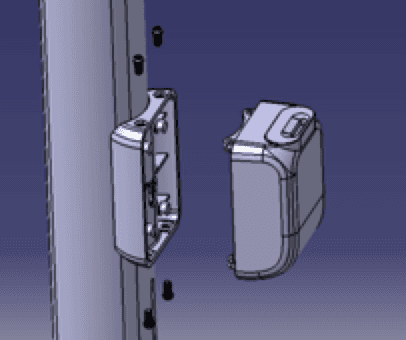
Step 1 - Remove the mechanical lock:
Remove 4 screws (M4) using a T15 bit. Disconnect the control wire connector. Remove the mechanical lock assembly.
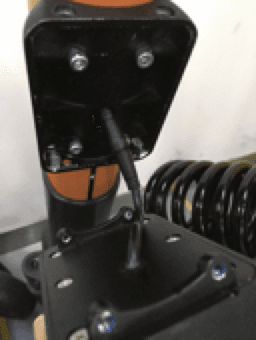
Step 2 - Remove the lock adapter:
Remove 4 screws (M4) using an H3 (3mm hex) bit. Remove the lock adapter from the mount.
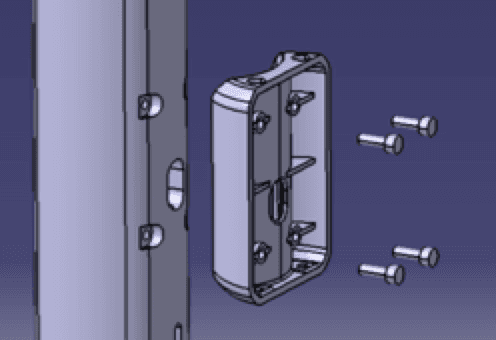
Step 3 - Install new lock adapter:
Position the new lock adapter and secure with 4 M4 screws using the H3 bit. Torque to specification.
Step 4 - Install new mechanical lock:
Position the new mechanical lock assembly. Reconnect the control wire connector. Secure with 4 M4 screws using the T15 bit.
Step 5 - Test:
Power on the scooter and test the lock/unlock function remotely from the Dashboard or Launcher app. Verify the mechanical lock engages and disengages correctly.
Notes
- Ensure the control wire connector clicks fully into place
- Do not overtighten the screws, which can strip the plastic mounting points
- After replacement, update the scooter record in the Dashboard if the lock type has changed
Running a fleet on this hardware?
Levy Fleets runs scooters, e-bikes, mopeds and golf carts on the IoT hardware you already have, with integration pages for 29 vendors including Segway, Okai, Omni, Queclink, Invers and Comodule. Keyless unlock, geofencing, rider payments and rider support are included, and the Managed plan is a share of revenue with no per-vehicle software fee.